
Looking for a SEO for beginners guide? In this blog post I’ll be discussing everything you need to know about optimising your own website for search engines.
Estimated reading time: 12 minutes
Different Types of SEO
There are 2 different types of SEO what we call on-page and off page.
On page SEO
On page is all about optimizing your own website, getting keywords right and in the right places as well as providing a good user experience.
Off page SEO
Off page SEO is more about having other sites link to yours. If you ever get cold emails from people offering to provide guest blog posts for ‘free’, it’s not free, they just want a link from your website to theirs.
This blog post focuses on on-page SEO.
Search Engine Goals
Whenever you sit down to do anything SEO related I want you to remember that every search engine wants to be the most popular. Because the most popular search engines get the most ad revenue and make most money.
To be the most popular search engine they need to serve up the best possible results for their users, otherwise they’ll go elsewhere.
And best possible results doesn’t just mean dishing up the correct information it’s about the whole experience for searchers, which is why we’ll be talking about user experience a little later on.
How search engines work
We can’t talk about SEO for beginners without first considering how search engines work.
No-one outside of Google knows how their ranking algorithm looks for and how much weight the different factors have, but we know that they look for several things.
Keywords and phrases tell Google what a web page is all about which is why they’re often seen as the stars of the show.
But they also look at things you might not expect such as how long a page takes to load, how long users spend on a web page and do they go on to visit other pages while they’re there.
What’s good for your visitors is generally good for SEO.
Text based
At the moment search engines can’t search video or audio, so it’s all about text. That doesn’t mean that they won’t in the future, it’s where we are right now.
If you predominantly create video or audio content right now you should think about how you can repurpose it into text content.
Why is user experience important?
If search engines produce search results on websites that have a poor user experience, searchers will switch to a different search engine. So when we talk about SEO for beginners it’s really important that we think about the user experience that our visitors will have.
Google knows how long visitors spend on your site after they land there and they also know that websites with a better experience will have visitors stay longer.
User experience
Make sure your pages load pretty quickly
3-4 seconds is the benchmark. If your site does take longer to load check out these resources on what you can do to get your website loading quicker.
Make sure that navigation is clear
so visitors can find their way around your site easily. This will also help you keep visitors on your website for longer.
It should be easy to contact you
Make all email addresses clickable. Give visitors choices when it comes to contacting you including contact forms, chat bots if they work for you, and even links to WhatsApp you.
Make sure all your links and buttons work
This is especially important if you have a blog on your site as blog posts tend to lend themselves more to external links which can be changed by the destination websites.
Use plenty of calls to action
Don’t frustrate visitors who are ready to work with you by not making it clear what the next step is or making it easy to take that step.
Put social media icons in the footer
I really advise against having them at the top of your site because you’re taking a chance visitors might wander off and get lost in the scroll.
Security certificate
It’s usually a given these days but still worth reiterating. Google isn’t going to prioritize websites without security certificates, because they don’t want to be sending their users to insecure websites. A d the way everyone is concerned with security online these days very few would hang around even if they did end up landing on a site with no security certificate.
What are SEO keywords and keyphrases
These are the words and phrases prospective visitors type into search engines to find the thing they’re looking for.
Short term vs long tail keywords
Short term keywords are keyword phrases that are 2-3 words long, longer tail keywords are 4-6 words long.
Generally, the shorter your keyword phrases are the broader the topic and the more competition you’ll have in search results.
The broader your search terms are the more people will be searching for them,which is why competition is higher.
The longer your keyword phrases are the more specific they’ll be and the less competition you’ll have in search results.
Keyword research tools
So how do you choose which keywords to optimise your website for? Through keyword research and keyword research tools.
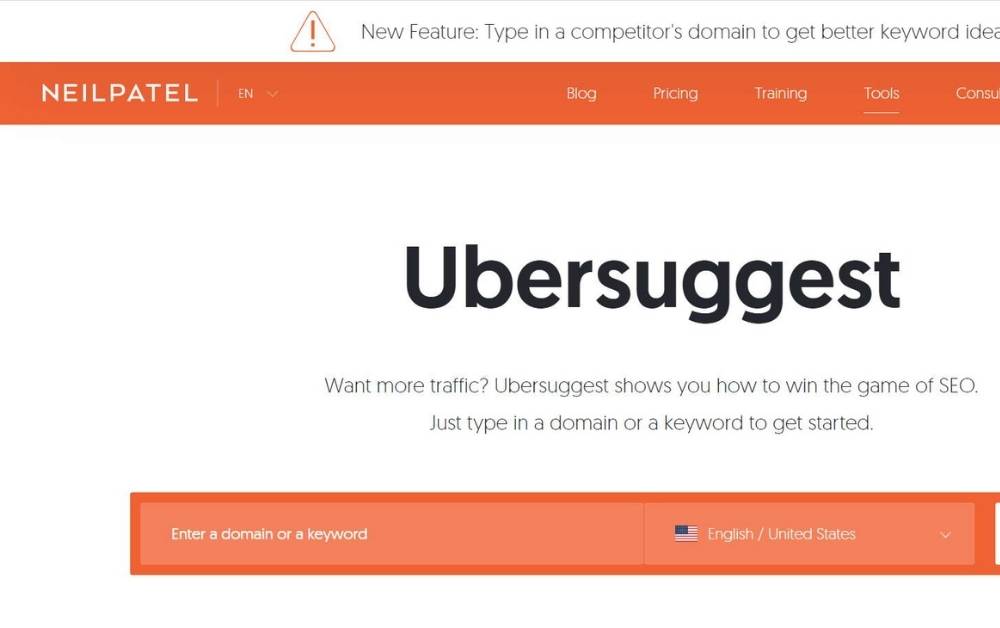
Ubersuggest
Ubersuggest is a great all round SEO tool. It allows you to scan the overall SEO health of your website and it will give you a list of issues to fix.
You can also analyse your competitors websites too, so you can find out which keywords they rank for.
And there’s the keyword research tool which will give you keyword suggestions and it will also tell you on average how many people search for the phrases it returns each month and how much competition there is to rank for it too.
It’s free to use up to 3 searches per day.
There’s also a Google Chrome extension where it gives you keyword data based on what you’re searching for. There’s a limit on the number of searches per day on the chrome extension too but it’s much higher than the main site.
Google Ad words keyword planner
The Google Adwords keyword planner is another free keyword research tool.
To use it you’ll need a Google Adwords account but to set up an account you’ll need to input card details. It will also ask you to set an amount for your first campaign but you can set it to £1 and stop it before the money is spent.
How to choose which keywords to optimise your website for?
Before we get into it it’s worth mentioning that you can optimise for more than one phrase per page. It’s also recommended that you do optimise for multiple phrases on your pages and blog posts.
If that thought overwhelms you, remember you don’t have to do it all at once. Start off optimising for a single phrase on each page or post, then come back and add more. You don’t have to do it all at once.
Be as niche and as specific as possible, with as little competition as possible. But remember that the keywords and phrases you choose need to be able to fit seamlessly into your copy.
For blog posts it’s easy to choose because you can create content specifically around those keywords.
But it’s trickier for pages because there is often key information that you need to include regardless of your keywords. Often we choose creative names for our products and services that don’t usually include key phrases.
Landing pages
You can create specific landing pages to target specific keywords too.
So you could decide to go broader with your homepage keyphrases and create a landing page to target a more specific phrase.
For example on my homepage I might choose to optimise for ‘WordPress website designer’.
But I might also decide that ‘WordPress website design small business’ is a good key phrase for me too, so I might create a new page with copy written specifically to target the second key phrase.
It wouldn’t appear on my menu, but search engines would know it was there, and when people land on it they see the menu for the rest of my site to browse.
Tracking keyword research
It’s important to track your keyword research for two reasons.
Firstly to make sure that you don’t optimise for a keyphrase more than once on your site and secondly because it will save you time when you create content.
Optimising for the same keyphrase more than once will leave you in competition with yourself when your time would be best spent optimising for other relevant keyphrases on your site.
Blogging
Where does blogging come into SEO?
- Allows you to target really niche keywords – as I mentioned earlier, blog posts allow you to get really specific with your keywords and keyphrases.
- Helps position you as an authority – blog posts allow you to really show off your expertise.
- Opportunity to add fresh new content consistently to your site – Google likes to serve up the freshest, most up to date content to it’s users and creating regular new blog posts will help.
How to optimise a WordPress website for search engines
Yoast SEO
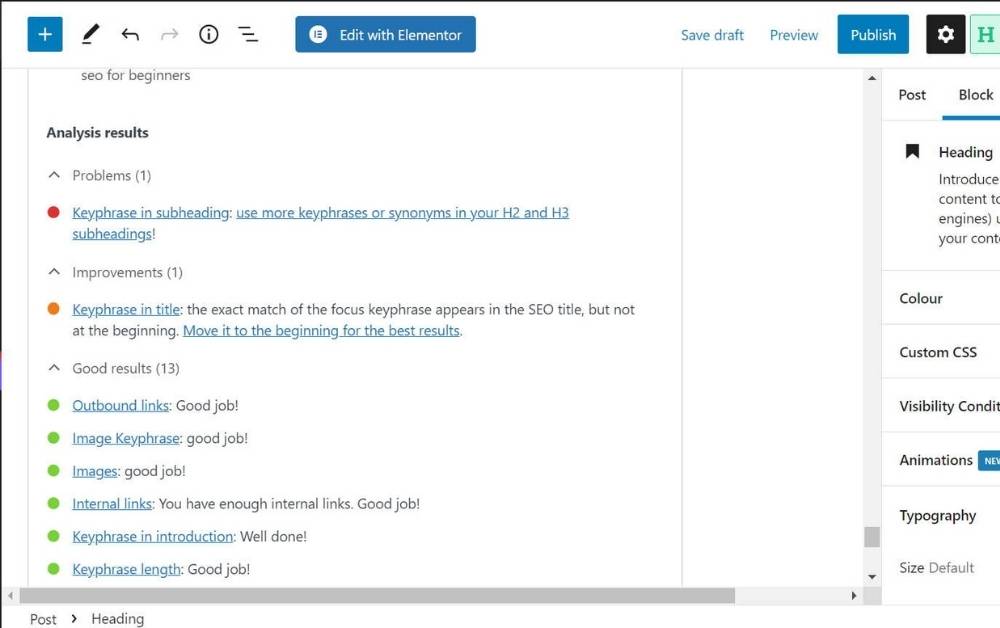
This is the #1 search engine optimisation plugin for WordPress. It gives you an interactive checklist on each page and post on your website to help you optimise it.
Permalink structure
Within WordPress it’s possible to choose how you want links to be structured. Ideally you want it set to include the page/post title. A word of warning, if you already have blog posts published, do not change your permalink structure without putting redirects in place.
Website title
Your website title will appear in search results along with the page / post title. Depending on the length of your business name you may want to put some keywords here.
Page/blog post title
This is one of the most important places to put your keywords. Search engines look for it to help them work out what the content is about and it appears in the actual search results too.
URL
This applies only to blog posts and SEO landing pages because the standard pages you’d have on your site like about or contact, even services if people are looking for them specifically they would likely Google your brand name + contact /about/services etc.
Add keyword phrase to Yoast
The Yoast SEO plugin adds a virtual SEO checklist to each page and blog post you create on your site. By adding your keywords / keyphrases it will then effectively grade how well the content is optimised for those words. As you optimise it will turn from red to green. Adding the keyword phrase to Yoast doesn’t send any kind of signal to Google telling them that it’s what your content is about. It’s purely an interactive checklist.
Meta description
This is the couple of sentences that appear below your content title when it appears in search results. It’s very important to add your keywords here and to also remember that this description could be the thing that makes someone click through to your site or not. Try to make it as engaging as possible.
Content
It’s recommended that you include your keyword phrase every 300 words or so in your content. But remember that it needs to sound natural and it will be easier to add keywords multiple times in blog post content than web pages.
Internal links
Where it’s relevant, it’s good practice to link to your other content on blog posts and web pages. This is not only useful to your visitors but it has the added benefit of encouraging visitors to spend more time on your site.
External links
Use these sparingly because we want to keep visitors on your site as long as possible. If you do add external links make sure they link to high quality trustworthy websites.
Images
before you upload images to your website rename the files to include your keywords. For example if I was writing a blog post to optimise for the phrase ‘what is WordPress’ I would name my image files What-Is-WordPress.jpeg
Always make sure that you resize your images and then compress before you upload them to your website too. I much prefer to compress before uploading rather than using a compression plugin because I prefer to keep plugins to a minimum.
A note on alt tags. They should include a description of the image for accessibility. I write image descriptions and then append my keyword phrase.
SEO:Simplified Workshop
It’s honestly that simple. If you’d like to see it in action check out my SEO: Simplified Workshop.
In this workshop I’ll teach you everything you need to know about optimising your own website to be found by search engines.
I’m talking:
- How to do keyword research – to make sure you’re optimising for the words people are typing into Google, not what you *think* they are
- How to track your keyword research – so that when you come to optimising your site you have all the info you need in one place
- SEO tools – including Google Search Console, SEO plugins and keyword research tools
- Implementation – here I’ll be showing you what it really looks like to optimise your WordPress website
- Blogging – how it can help dream clients find you online
Get instant access to the SEO: Simplified Workshop here
Other SEO tools
Other useful SEO tools to check out are Google Analytics and Google Search Console.
These are free tools provided by Google to help you track your search performance and other data related to your website.
Google Analytics provides in depth data on how many people use your site and when. It also includes your most popular content, where your traffic comes from and more.
Check out my guide to the Google Analytics dashboard here.
Google Search Console is very much focused on data related to your site’s performance in search results. It includes how often it appears in search results, how many people click through and more.
It will also alert you if it can’t index pages on your site or it’s not mobile friendly.
SEO for beginners: summary
- Search engines want to provide the best quality search results for their users.
- SEO is split into 2 parts – on and off page. Off page is all about links to a site, on page is about optimising for keywords and providing a great user experience.