
Do you want to create an Instagram page on your WordPress website? If you already have a website, creating a page specifically for your social media links is a smart move.
You can set one up really quickly and easily and it will be 100% on brand without having to pay for a service like Link Tree or Milkshake.
In this article I will discuss exactly what an Instagram landing page is, why you need one and how you can create one on your WordPress website.
Estimated reading time: 7 minutes
What is an Instagram landing page?
An Instagram landing page is a page that you have set up specifically to link from your profile on Instagram or any other social media platform that doesn’t let you link directly from the caption.
They’re sometimes called ‘link in bio’ links because that’s how people refer to them from their posts. Often you’ll see a creator promoting a product or service in an Instagram post and at the end they’ll see check out the link in my bio.
What is a WordPress Instagram landing page?
In a nutshell, it’s a page you build on your WordPress website that you only link to from Instagram.
You wouldn’t have this page on any menu on your website, you’d only link to it in your Instagram bio.
Why create an Instagram page on WordPress?
If you have a WordPress website already, it’s really easy to set one up, and means you don’t have to pay additional monthly fees to companies like Linktree. Most of these companies do have free plans but, the design options tend to be very limiting.
You get much more control over the look and feel of a page that you build on your own site. This helps with brand continuity. Your visitors won’t see any difference between your main website and your Instagram specific page when they’re both built in the same place.
Get the Winning Website Starter Kit
If you’ve read this post and are now thinking, yes Kim, you’ve convinced me, how do I get my own business website?
I have created a step by step guide taking you through the process of creating a WordPress website from start to finish. It covers the tech side of things (what’s a domain name? how do I get hosting? and more) along with design tips and tricks and pointers on the kind of content to include.
You can get it free when you join my email list today.
How to create an Instagram landing page on your WordPress website?
It’s really simple to set up a link in bio page on your WordPress website. You create a new page, as you would any other but you don’t add it to your menu. That’s it.
You can use the WordPress block editor to add content to it or your usual page builder plugin (e.g. Elementor) if you use them.
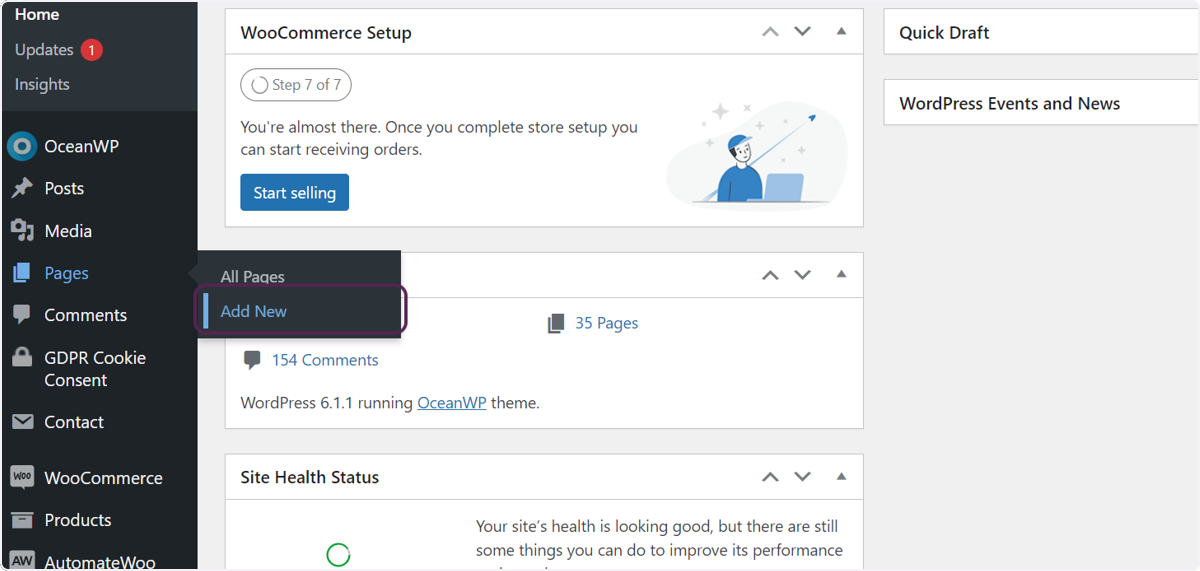
Here’s how to create a new page in WordPress
Hover over the ‘Pages’ option and then click the ‘Add New’ option that appears.
Give your page a title
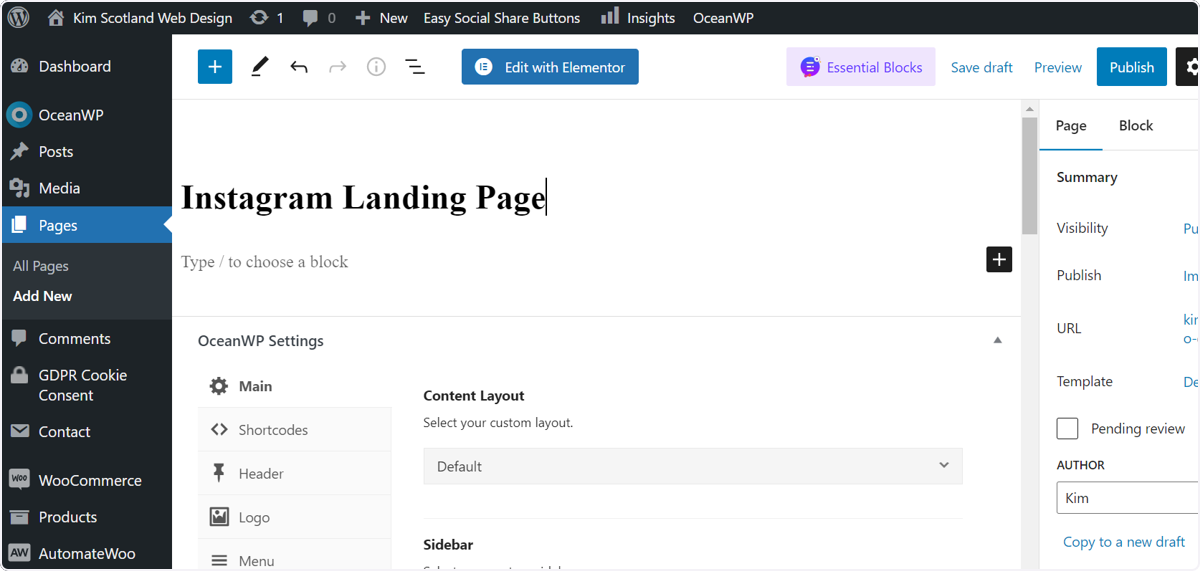
Add your content
Do this either by using the WordPress block editor or your page builder plugin, like Elementor, if you use one.
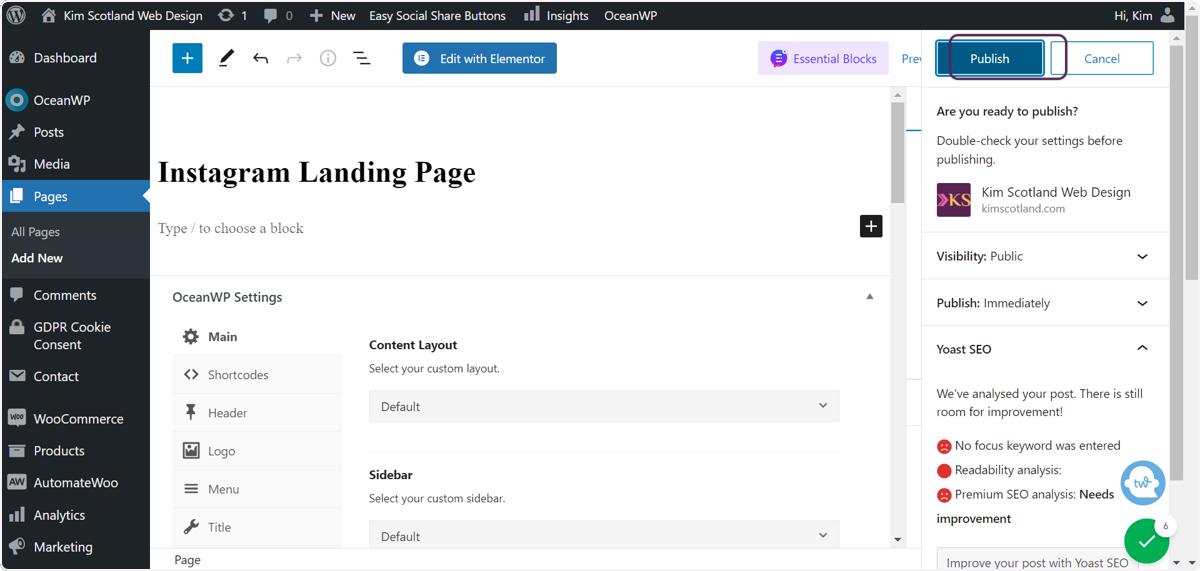
When you’re happy, click on the ‘Publish’ button (and if you’re prompted to confirm click the ‘Publish’ button again.
What should you include on this page?
I recommend that you link to 4-5 places that would benefit your audience here.
Think about linking to your lead magnet, a call scheduler (if you book calls for your service), the sales page of the thing you’re promoting at the moment and 1-2 other things that you talk about in your feed content.
It’s tempting to list ALL your offers on this page. But if you list any more than 4-5 you risk overwhelming your audience which will lead to them doing nothing. So think about your priorities for the month or the quarter and stick to them.
This page can and should change as your sales goals and social media goals change.
For example if you’re focussed on email list building, I would suggest that your lead magnet should be the first link.
And when you do go into a launch phase, you should change the link in your Instagram bio to go directly to your sales page.
How should I lay out my page?
There are no hard and fast rules here. The one thing to keep in mind is that the majority of the people who are going to see this page will be using a phone. But that doesn’t mean that no-one will check it out on a laptop or desktop.
So design for mobiles first, but make sure it looks tidy on tablets and laptops / desktops too.
Some people create a simple list of buttons, similar to the pages you can create on a free Linktree account.
I like to have a couple of benefit driven sentences with calls to action on my Instagram landing page because I think that’s more effective in converting those visitors to clients. And I alternate these with images to add a bit of interest.
I would always recommend that you use buttons as your links, but apart from that you can get really creative here.
Social media landing page vs traditional landing page
I think that social media landing pages in this instance are slightly different to more traditional landing pages.
A traditional landing page has one goal – to convert the visitor somehow. Whether that’s to sign up to an email list, to buy a thing or book a call. In this case, we eliminate all distractions and focus on nudging our visitors towards that one thing.
But an Instagram or social media landing page, in my view, should be treated slightly differently. This is a page that you link to when you’re not in launch mode. Somewhere that you send people from your feed to get a feel for the kind of stuff that you do.
How to create an effective Instagram post in WordPress: summary
- Instagram landing pages are pages that users set up to link from their profiles on Instagram and other social media platforms that don’t allow links from their captions.
- A WordPress Instagram page is a page created for Instagram (or other platforms) that is created on your WordPress website.
- Creating a page to link from Instagram on your own website ensure brand continuity. Visitors won’t notice a difference between your main site and any social media specific pages because they’re all built in the same place. It can be cheaper too.
- Creating an Instagram page on WordPress is as simple as creating any other page on your site, you just don’t add it to your menu.
- There are no specific rules for the design and layout of this page. Bear in mind that most people will view it on mobiles, but it still needs to work and look good on tablets and laptops too.
- Check out my Instagram page template for Elementor – get it for £15
- I recommend that you use buttons for your links, so that visitors don’t miss them
You may also enjoy
How to create a website with Elementor
How to install Elementor templates in 3 really simple steps
4 top reasons to choose website design templates for your business